Information is arguably an organization’s most valuable asset in today’s data-driven world. However, without proper management, this asset can quickly become a liability. Microsoft Fabric, a revolutionary unified analytics platform, integrates everything from data engineering and data science to data warehousing and business intelligence into a single, SaaS-based environment. It provides powerful tools to store, process, analyze, and visualize vast data. But with great power comes great responsibility. To maintain trust, ensure security, uphold data quality, and meet ever-increasing compliance demands, implementing a robust data governance framework within Fabric isn’t just recommended—it’s essential.
Effective data governance ensures that data remains accurate, secure, consistent, and usable throughout its entire lifecycle, aligning technical capabilities with strategic business goals and stringent regulatory requirements like GDPR, HIPAA, or CCPA. Within the Fabric ecosystem, this translates to leveraging its built-in governance features and its seamless integration with Microsoft Purview, Microsoft’s comprehensive data governance and compliance suite. The goal is to effectively manage and protect sensitive information while empowering users, from data engineers and analysts to business users and compliance officers, to confidently discover, access, and derive value from data within well-defined, secure guardrails.
A well-designed governance plan in Fabric strikes a critical balance between enabling user productivity and innovation and enforcing necessary controls for compliance and risk mitigation. It’s about establishing clear policies, defining roles and responsibilities, and implementing consistent processes so that, as the adage goes, “the right people can take the right actions with the right data at the right time”. This guide provides a practical, step-by-step approach to implementing such a framework within Microsoft Fabric, leveraging its native capabilities and Purview integration to build a governed, trustworthy data estate.
The Critical Importance of Data Governance
Data governance is more than just an IT buzzword or a compliance checkbox; it is a fundamental strategic imperative for any organization looking to leverage its data assets effectively and responsibly. The need for robust governance becomes even more pronounced in the context of a powerful, unified platform like Microsoft Fabric, which brings together diverse data workloads and user personas. Implementing strong data governance practices yields numerous critical benefits:
- Ensuring Data Quality and Consistency: Governance establishes standards and processes for creation, maintenance, and usage, leading to more accurate, reliable, and consistent data across the organization. This is crucial for trustworthy analytics and informed decision-making. Poor data quality can lead to flawed insights, operational inefficiencies, and loss of credibility.
- Enhancing Data Security and Protection: A core function of governance is to protect sensitive data from unauthorized access, breaches, or misuse. By defining access controls, implementing sensitivity labeling (using tools like Microsoft Purview Information Protection), and enforcing security policies, organizations can safeguard confidential information, protect intellectual property, and maintain customer privacy.
- Meeting Regulatory Compliance Requirements: Organizations operate under a complex web of industry regulations and data privacy laws (such as GDPR, CCPA, HIPAA, SOX, etc.). Data governance provides the framework, controls, and audit trails necessary to demonstrate compliance, avoid hefty fines, and mitigate legal risks. Features like data lineage and auditing in Fabric, often powered by Purview, are essential.
- Improving Data Discoverability and Usability: A well-governed data estate makes it easier for users to find the data they need. Features like the OneLake data hub, data catalogs, business glossaries, endorsements (certifying or promoting assets), and descriptive metadata help users quickly locate relevant, trustworthy data, fostering reuse and reducing redundant data preparation efforts.
- Building Trust and Confidence: When users know that data is well-managed, secure, and accurate, they have greater confidence in the insights derived from it. This trust is foundational for fostering a data-driven culture where decisions are based on reliable evidence.
- Optimizing Operational Efficiency: Governance helps streamline data-related processes, reduce data duplication, clarify ownership, and improve team collaboration. This leads to increased efficiency, reduced costs for managing poor-quality or redundant data, and faster time-to-insight.
- Enabling Scalability and Innovation: While governance involves controls, it also provides the necessary structure to manage data effectively as volumes and complexity grow. A solid governance foundation allows organizations to innovate confidently, knowing their data practices are sound and scalable.
Data governance transforms data from a potential risk into a reliable, strategic asset, enabling organizations to maximize their value while minimizing associated risks within the Microsoft Fabric environment.
An Overview of Microsoft Fabric
Understanding the platform itself is helpful before diving into the specifics of governance implementation. Microsoft Fabric represents a significant evolution in the analytics landscape, offering an end-to-end, unified platform delivered as a Software-as-a-Service (SaaS) solution. It aims to simplify analytics for organizations by combining disparate data tools and services into a single, cohesive environment built around a central data lake called OneLake.

Fabric integrates various data and analytics workloads, often referred to as “experiences,” which traditionally required separate, usually complex, integrations:
- Data Factory: Provides data integration capabilities for ETL (Extract, Transform, Load) and ELT (Extract, Load, Transform) processes, enabling data movement and transformation at scale.
- Synapse Data Engineering: A Spark-based large-scale data transformation and preparation platform primarily uses notebooks.
- Synapse Data Science: Provides an end-to-end workflow for data scientists to build, deploy, and manage machine learning models.
- Synapse Data Warehousing: Delivers a next-generation SQL engine for traditional data warehousing workloads, offering high performance over open data formats.
- Synapse Real-Time Analytics: This technology enables the real-time analysis of data streaming from various sources, such as IoT devices and logs.
- Power BI: The well-established business intelligence and visualization service, fully integrated for reporting and analytics.
- Data Activator: A no-code experience for monitoring data and triggering actions based on detected patterns or conditions.

Shortcuts allow your organization to easily share data between users and applications without unnecessarily moving and duplicating information. When teams work independently in separate workspaces, shortcuts enable you to combine data across different business groups and domains into a virtual data product to fit a user’s specific needs.
A shortcut is a reference to data stored in other file locations. These file locations can be within the same workspace or across different workspaces, within OneLake or external to OneLake in ADLS, S3, or Dataverse, with more target locations coming soon. No matter the location, shortcuts make files and folders look like you have stored locally. For more information on how to use shortcuts, see OneLake shortcuts.
Underpinning all these experiences is OneLake, Fabric’s built-in, tenant-wide data lake. OneLake eliminates data silos by providing a single, unified storage system for all data within Fabric, regardless of which experience created or uses it. It’s built on Azure Data Lake Storage Gen2. Still, it adds shortcuts (allowing data to be referenced without moving or duplicating it) and a unified namespace, simplifying data management and access.
This unified architecture has profound implications for governance. By centralizing data storage (OneLake) and providing a familiar administrative interface (Fabric Admin Portal), Fabric facilitates the application of consistent governance policies, security controls, and monitoring across the entire analytics lifecycle. Features like sensitivity labels and lineage can often propagate automatically across different Fabric items, simplifying the task of governing a complex data estate. Understanding this integrated nature is key to effectively implementing governance within the platform.
Understanding Microsoft Purview: The Governance Foundation
While Microsoft Fabric provides the unified analytics platform, Microsoft Purview is the overarching data governance, risk, and compliance solution that integrates deeply with Fabric to manage and protect the entire data estate. Understanding Purview’s role is crucial for implementing effective governance in Fabric.

Microsoft Purview is a family of solutions designed to help organizations govern, protect, and manage data across their entire landscape, including Microsoft 365, on-premises systems, multi-cloud environments, and SaaS applications like Fabric. Its key capabilities relevant to Fabric governance include:
- Unified Data Catalog: Purview automatically discovers and catalogs Fabric items (like lakehouses, warehouses, datasets, reports) alongside other data assets. It creates an up-to-date map of the data estate, enabling users to easily find and understand data through search, browsing, and business glossary terms.
- Data Classification and Sensitivity Labels: Through integration with Microsoft Purview Information Protection, Purview allows organizations to define sensitivity labels (e.g., Confidential, PII) and apply them consistently across Fabric items. This classification helps identify sensitive data and drives protection policies.

- End-to-End Data Lineage: Purview provides visualization of data lineage, showing how data flows and transforms from its source through various Fabric processes (e.g., Data Factory pipelines, notebooks) down to Power BI reports. This is vital for impact analysis, troubleshooting, and demonstrating compliance.
- Data Loss Prevention (DLP): Purview DLP policies can be configured (currently primarily for Power BI semantic models within Fabric) to detect sensitive information based on classifications or patterns (like credit card numbers) and prevent its unauthorized sharing or exfiltration, providing alerts and policy tips.
- Auditing: All user and administrative activities within Fabric are logged and made available through Microsoft Purview Audit, providing a comprehensive trail for security monitoring and compliance investigations.
- Purview Hub in Fabric: This centralized page within the Fabric experience provides administrators and governance stakeholders with insights into their Fabric data estate, including sensitivity labeling coverage, endorsement status, and a gateway to the broader Purview governance portal.

Purview is the central governance plane that overlays Fabric (and other data sources), providing the tools to define policies, classify data, track lineage, enforce protection, and consistently monitor activities. The seamless integration ensures that as data moves and transforms within Fabric, the governance context (like sensitivity labels and lineage) is maintained, enabling organizations to build a truly governed and trustworthy analytics environment.
https://learn.microsoft.com/en-us/purview/data-governance-overview
Step-by-Step Process for Implementing Data Governance in Microsoft Fabric
Implementing data governance in Microsoft Fabric is a phased process that involves defining policies, configuring technical controls, assigning responsibilities, and establishing ongoing monitoring. Here’s a practical step-by-step guide:
Step 1: Define Your Governance Policies and Framework
Before configuring any tools, establish the foundation – your governance framework. This involves defining the rules, standards, and responsibilities that will guide data handling within Fabric.
- Identify Stakeholders and Requirements: Assemble a cross-functional team including representatives from IT, data management, legal, compliance, and key business units. Collaboratively identify all applicable external regulations (e.g., GDPR, HIPAA, or CCPA) and internal business requirements (e.g., data quality standards, retention policies, ethical use guidelines). Understanding these requirements is crucial for tailoring your policies.
- Develop Data Classification Policies: Define clear data sensitivity levels (e.g., Public, Internal, Confidential, Highly Restricted). Map these levels to Microsoft Purview Information Protection sensitivity labels. Establish clear policies detailing how data in each classification level must be handled regarding access, sharing, encryption, retention, and disposal. For example, it mandates that all data classified as “Highly Restricted” must be encrypted and access restricted to specific roles. https://learn.microsoft.com/en-us/purview/sensitivity-labels
- Configure Tenant Settings via Admin Portal: Fabric administrators should configure tenant-wide governance settings in the Fabric Admin Portal. This includes defining who can create workspaces, setting default sharing behaviors, enabling auditing, configuring capacity settings, and potentially restricting specific Fabric experiences. Many settings can be delegated to domain or capacity admins, where appropriate, for more granular control. Consider licensing requirements for advanced Purview features like automated labeling or DLP. https://learn.microsoft.com/en-us/fabric/admin/about-tenant-settings
- Document and Communicate: Document all governance policies, standards, and procedures. Make this documentation easily accessible to all Fabric users. Communicate the policies effectively, explaining their rationale and clarifying user responsibilities. Assign clear accountability for policy enforcement, often involving data stewards, data owners, and workspace administrators.
Step 2: Establish Roles and Access Controls (RBAC)
With policies defined, implement Role-Based Access Control (RBAC) to enforce them.
- Utilize Workspace Roles: Assign users or (preferably) security groups to Fabric workspace roles (Admin, Member, Contributor, Viewer) based on the principle of least privilege. Understand the permissions associated with each role to ensure users only have the access necessary for their jobs. https://learn.microsoft.com/en-us/fabric/fundamentals/roles-workspaces
- Leverage Security Groups: Manage access primarily through Microsoft Entra ID (formerly Azure AD) security groups rather than individual user assignments. This simplifies administration as team memberships change.
- Assign Admin Roles: Carefully assign higher-level administrative roles: Fabric Administrator (tenant-wide), Domain Administrator (for specific business areas), and Capacity Administrator (for managing compute resources)—delegate responsibilities where appropriate to distribute the governance workload. https://learn.microsoft.com/en-us/fabric/admin/roles
- Implement Granular Security: For sensitive data within datasets, lakehouses, or warehouses, implement Row-Level Security (RLS) and Object-Level Security (OLS) (e.g., column-level or table/view permissions) to restrict access at a finer grain than workspace roles allow. https://learn.microsoft.com/en-us/fabric/data-warehouse/row-level-security, https://learn.microsoft.com/en-us/fabric/security/service-admin-row-level-security and https://learn.microsoft.com/en-us/fabric/data-warehouse/column-level-security
- Establish Access Review Processes: Implement procedures for requesting, approving, and periodically reviewing access permissions, especially for sensitive data or privileged roles. Maintain logs of approvals for audit purposes.
Step 3: Configure Workspaces and Domains
Organize your Fabric environment logically to support governance.
- Structure Domains: Group workspaces into logical domains, typically aligned with business units or subject areas (e.g., Finance, Marketing, Product Analytics). This facilitates delegated administration and helps users discover relevant data. https://learn.microsoft.com/en-us/fabric/governance/domains
- Organize Workspaces: Within domains, organize workspaces based on purpose (e.g., project, team) or environment (Development, Test, Production). Use clear naming conventions and descriptions. Assign workspaces to the appropriate domain. https://learn.microsoft.com/en-us/fabric/fundamentals/workspaces
- Apply Workspace Settings: Configure settings within each workspace, such as contact lists, license modes (Pro, PPU, Fabric capacity), and connections to resources like Git for version control, aligning them with your governance policies.
- Consider Lifecycle Management: Use separate workspaces and potentially Fabric deployment pipelines to manage content promotion from development through testing to production, ensuring only validated assets reach end-users. https://learn.microsoft.com/en-us/fabric/cicd/deployment-pipelines/understand-the-deployment-process?tabs=new-ui
Step 4: Implement Data Protection and Security Measures
Actively protect your data assets using built-in and integrated tools.
- Apply Sensitivity Labels: Implement the data classification policy by applying Microsoft Purview Information Protection sensitivity labels to Fabric items (datasets, reports, lakehouses, etc.). Use a combination of manual labeling by users, default labeling on workspaces or items, and automated labeling based on sensitive information types detected by Purview scanners. Ensure label inheritance policies are configured appropriately. https://learn.microsoft.com/en-us/power-bi/enterprise/service-security-enable-data-sensitivity-labels
- Configure Data Loss Prevention (DLP) Policies: Define and enable Microsoft Purview DLP policies specifically for Power BI (and potentially other Fabric endpoints as capabilities expand) to detect and prevent the inappropriate sharing or exfiltration of sensitive data identified by sensitivity labels. (Note: Requires specific Purview licensing.) https://learn.microsoft.com/en-us/fabric/governance/data-loss-prevention-configure
- Leverage Encryption: Understand and utilize Fabric’s encryption capabilities, including encryption at rest (often managed by the platform) and potentially customer-managed keys (CMK) for enhanced control over encryption if required. https://learn.microsoft.com/en-us/fabric/security/security-scenario

Step 5: Enable Monitoring and Auditing
Visibility into data usage and governance activities is crucial.
- Utilize the Monitoring Hub to monitor the status and history of Fabric activities like pipeline runs, Spark jobs, and dataflow refreshes. https://learn.microsoft.com/en-us/fabric/admin/monitoring-hub
- Analyze Capacity Metrics: Use the Fabric Capacity Metrics app to monitor resource utilization, performance, and potential throttling, helping optimize costs and ensure service levels. https://learn.microsoft.com/en-us/fabric/enterprise/metrics-app
- Leverage the Purview Hub: Use the integrated Purview Hub within Fabric as a central point for administrators and data owners to view governance insights, manage metadata, and track compliance status. https://learn.microsoft.com/en-us/fabric/governance/use-microsoft-purview-hub?tabs=overview
- Enable and Review Audit Logs: Ensure Fabric auditing is enabled and integrated with the Microsoft Purview compliance portal. Regularly review audit logs to track user activities, access patterns, policy changes, and potential security incidents. https://learn.microsoft.com/en-us/fabric/admin/track-user-activities
- Use Admin Monitoring Workspace: Fabric administrators can use the dedicated monitoring workspace to gain insights into tenant-wide activities, usage patterns, and adoption. https://learn.microsoft.com/en-us/fabric/admin/monitoring-workspace
Step 6: Foster Data Discovery, Trust, and Reuse
Governance should also empower users by making trustworthy data easily accessible.
- Promote the OneLake Data Hub: Encourage users to utilize the OneLake Data Hub to discover existing data items across the tenant, filtering by domain, keywords, or endorsement status. https://learn.microsoft.com/en-us/fabric/governance/onelake-catalog-overview and https://learn.microsoft.com/en-us/fabric/governance/onelake-catalog-govern
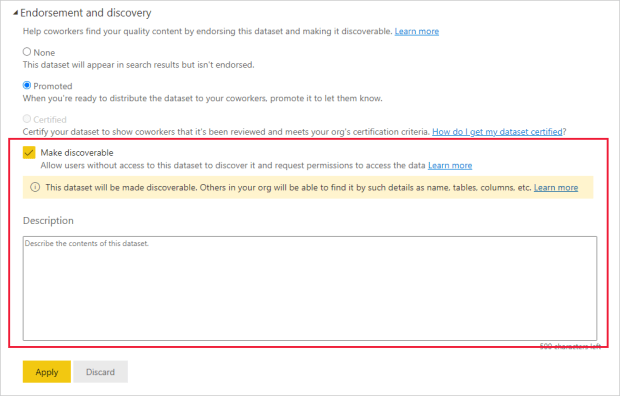
- Implement Endorsement: Establish a straightforward process for promoting and certifying high-quality, reliable data assets (datasets, dataflows, reports). Clearly define the criteria for certification and authorize specific reviewers. This builds user trust in endorsed assets. https://learn.microsoft.com/en-us/fabric/governance/endorsement-overview
- Utilize Tags: Encourage using relevant tags on fabric items to improve organization and searchability beyond standard metadata. https://learn.microsoft.com/en-us/fabric/governance/tags-overview
- Leverage Lineage and Impact Analysis: Use Fabric’s lineage view to understand data origins, transformations, and dependencies. Before changing upstream items, perform an impact analysis to understand potential effects on downstream reports or processes. https://learn.microsoft.com/en-us/fabric/governance/lineage
- Build a Business Glossary: Integrate with Microsoft Purview Data Catalog to build and maintain a business glossary, consistently defining key terms and metrics across the organization and linking them to relevant Fabric assets. https://learn.microsoft.com/en-us/purview/legacy/how-to-create-manage-glossary-term
Step 7: Monitor, Iterate, and Optimize
Data governance is not a one-time project but an ongoing process.
- Regularly Review and Audit: Periodically review governance policies, access controls, label usage, and audit logs to ensure effectiveness and identify areas for improvement. https://learn.microsoft.com/en-us/fabric/governance/governance-compliance-overview
- Gather Feedback: Solicit feedback from users and stakeholders on the governance processes and tools.
- Adapt and Update: Update policies and configurations based on audit findings, user feedback, changing regulations, and evolving business needs. Stay informed about new Fabric and Purview governance features.
By following these steps, organizations can establish a comprehensive and practical data governance framework within Microsoft Fabric, enabling them to harness the full power of the platform while maintaining control, security, and compliance.
Real-World Examples: Data Governance in Action
The principles and steps outlined above are not just theoretical; organizations are actively implementing robust data governance frameworks using Microsoft Fabric and Purview to overcome challenges and drive value. Let’s look at a couple of examples:
1. Microsoft’s Internal Transformation:

Microsoft itself faced significant hurdles with its vast and complex data estate. Data was siloed across various business units and managed inconsistently, making it difficult to gain a unified enterprise view. Governance was often perceived as a bottleneck, hindering the pace of digital transformation. Microsoft embarked on its data transformation journey, leveraging its tools to address this.
Their strategy involved building an enterprise data platform centered around Microsoft Fabric as the unifying analytics foundation and Microsoft Purview for governance. Fabric helped break down silos by providing a common platform (including OneLake) for data integration and analytics across diverse sources. Purview was then layered on top to enable responsible data democratization. This meant implementing controls like a shared data catalog and consistent policies, not to restrict access arbitrarily, but to enable broader, secure access to trustworthy data. A key cultural shift was viewing governance as an accelerator for transformation, facilitated by the unified data strategy and strong leadership alignment. The outcome is a more agile, regulated, and business-focused data environment that fuels faster decision-making and innovation.
2. Leading Financial Institution:

A leading bank operating in a highly regulated industry revolutionized its data governance with Microsoft Purview. While specific challenges aren’t detailed in the summary, typical banking concerns include operational efficiency, stringent compliance requirements (like GDPR), data security, and preventing sensitive data loss.
By implementing Purview, the bank achieved significant improvements. Operationally, automated data discovery and a centralized view allowed business users to find information faster and reduced manual effort in reporting. From a compliance perspective, Purview provided centralized metrics for monitoring the compliance posture and automated processes for classifying and tagging data according to regulations, strengthening overall security. Furthermore, implementing Data Loss Prevention (DLP) rules based on data sensitivity helped safeguard critical information and prevent unauthorized access or sharing. Purview acted as a unified platform, enhancing efficiency, visibility, security, and control over the bank’s data assets.
These examples illustrate how organizations, facing everyday challenges like data silos, compliance pressures, and the need for agility, are successfully using Microsoft Fabric and Purview to establish effective data governance. They highlight the importance of a unified data strategy, the role of tools in automating and centralizing controls, and the cultural shift towards viewing governance as an enabler of business value.
Conclusion
Microsoft Fabric offers a robust, unified platform for end-to-end analytics, but realizing its full potential requires a deliberate and comprehensive approach to data governance. As we’ve explored, implementing governance in Fabric is not merely about restricting access; it’s about establishing a framework that ensures data quality, security, compliance, and usability, fostering trust and enabling confident, data-driven decision-making across the organization.
The real-world examples, from Microsoft’s internal transformation to implementations in regulated industries like finance, demonstrate that these are not just theoretical concepts. Organizations are actively leveraging Fabric’s unified foundation and Purview’s comprehensive governance capabilities to overcome tangible challenges like data silos, inconsistent management, compliance burdens, and operational inefficiencies.
By integrating Fabric’s built-in features—such as the Admin Portal, domains, workspaces, RBAC, endorsement, and lineage—with the advanced capabilities of Microsoft Purview—including Information Protection sensitivity labels, Data Loss Prevention, auditing, and the unified data catalog—organizations can create a robust governance posture tailored to their specific needs.
The outlined step-by-step process provides a roadmap, but the journey requires more than technical implementation. Success hinges on several key factors, reinforced by real-world experience:
Key Recommendations for Success:
- Strategic Alignment and Collaboration: As seen in Microsoft’s case, define clear governance objectives that are aligned with business goals before configuring tools. Data governance requires a cultural shift and strong leadership alignment. It’s a team effort involving IT, data, legal, compliance, and business units.
- Leverage the Unified Platform (Fabric + Purview): Treat Fabric and Purview as an integrated solution. Use Fabric to unify the data estate and Purview to apply consistent governance controls across it, enabling responsible democratization and breaking down silos.
- Prioritize Automation for Efficiency and Consistency: Automate governance tasks like sensitivity labeling, policy enforcement (DLP), and monitoring wherever possible. As the banking case study demonstrated, this reduces manual effort, ensures consistency, improves responsiveness, and boosts operational efficiency.
- Focus on User Empowerment and Education: Balance control with usability. Provide clear documentation, training, and tools (like the OneLake Data Hub and Purview catalog) to help users understand policies, find trustworthy data, and comply with requirements – turning governance into an accelerator, not a blocker.
- Implement Incrementally and Iterate: Data governance is an ongoing journey. Start with a pilot or focus on critical assets first. Monitor effectiveness, gather feedback, and continuously refine your approach based on evolving needs, regulations, and platform capabilities.
By taking a structured, collaborative, and tool-aware approach, informed by others’ successes, organizations can build a foundation of trust and control within Microsoft Fabric, transforming governance from a perceived burden into a strategic enabler that unlocks the actual value of their data.
Should you have any questions or need assistance about Microsoft Fabric or Microsoft Purview, please don’t hesitate to contact me using the provided link: https://lawrence.eti.br/contact/
That’s it for today!
Sources
- Implementing Data Governance in Power BI (Lawrence ETI Blog) –
https://lawrence.eti.br/2023/01/29/implementing-data-governance-in-power-bi-a-step-by-step-guide/ - Microsoft Learn: Governance and compliance in Microsoft Fabric –
https://learn.microsoft.com/en-us/fabric/governance/governance-compliance-overview - Microsoft Learn: Govern your Fabric data with the OneLake catalog –
https://learn.microsoft.com/en-us/fabric/governance/onelake-catalog-govern - Microsoft Learn: What is Microsoft Fabric? –
https://learn.microsoft.com/en-us/fabric/fundamentals/microsoft-fabric-overview - Microsoft Learn: OneLake, the OneDrive for data –
https://learn.microsoft.com/en-us/fabric/onelake/onelake-overview - Microsoft Learn: Information protection in Microsoft Fabric –
https://learn.microsoft.com/en-us/fabric/governance/information-protection - Microsoft Learn: What is the admin portal? –
https://learn.microsoft.com/en-us/fabric/admin/admin-overview - Microsoft Learn: Workspace roles –
https://learn.microsoft.com/en-us/fabric/get-started/roles-workspaces - Microsoft Learn: Admin roles –
https://learn.microsoft.com/en-us/fabric/admin/roles - Microsoft Learn: Security overview –
https://learn.microsoft.com/en-us/fabric/security/security-overview#data-security - Microsoft Learn: Domains –
https://learn.microsoft.com/en-us/fabric/governance/domains - Microsoft Learn: Introduction to deployment pipelines –
https://learn.microsoft.com/en-us/fabric/cicd/deployment-pipelines/intro-deployment-pipelines - Microsoft Learn: Learn about data loss prevention policies for Power BI –
https://learn.microsoft.com/en-us/purview/dlp-powerbi-learn-about - Microsoft Learn: Encryption –
https://learn.microsoft.com/en-us/fabric/security/security-encryption - Microsoft Learn: Monitoring hub –
https://learn.microsoft.com/en-us/fabric/admin/monitoring-hub - Microsoft Learn: Microsoft Fabric Capacity Metrics –
https://learn.microsoft.com/en-us/fabric/enterprise/metrics-app - Microsoft Learn: Use the Microsoft Purview hub –
https://learn.microsoft.com/en-us/fabric/governance/use-microsoft-purview-hub - Microsoft Learn: Track user activities in Microsoft Fabric –
https://learn.microsoft.com/en-us/fabric/admin/track-user-activities - Microsoft Learn: Admin monitoring –
https://learn.microsoft.com/en-us/fabric/admin/admin-monitoring - Microsoft Learn: OneLake data hub –
https://learn.microsoft.com/en-us/fabric/governance/onelake-catalog-overview - Microsoft Learn: Endorsement overview –
https://learn.microsoft.com/en-us/fabric/governance/endorsement-overview - Microsoft Learn: Tags –
https://learn.microsoft.com/en-us/fabric/governance/tags - Microsoft Learn: Lineage –
https://learn.microsoft.com/en-us/fabric/governance/lineage - Microsoft Learn: Create and manage glossary terms –
https://learn.microsoft.com/en-us/purview/how-to-create-edit-glossary-terms - YASH Technologies Blog: Microsoft Fabric Data Governance: What You Need Today –
https://www.yash.com/blog/comprehensive-guide-to-data-governance-in-microsoft-fabric/ - Microsoft Inside Track: Transforming Data Governance at Microsoft with Purview and Fabric –
https://www.microsoft.com/insidetrack/blog/transforming-data-governance-at-microsoft-with-microsoft-purview-and-microsoft-fabric/ - Kanerika Case Study: Achieving Data Governance Excellence with Microsoft Purview –
https://kanerika.com/case-studies/revolutionizing-data-governance-for-a-leading-bank-with-microsoft-purview/