In today’s world, we’re surrounded by data. From company reports and legal, intellectual property documents to academic papers and scanned invoices, a vast amount of our collective knowledge is stored in PDF files. For decades, PDFs have been the digital equivalent of a printed page, easy to share and view, but incredibly difficult to work with. This has created a massive bottleneck in the age of Artificial Intelligence (AI).
As a technology leader, you’re constantly looking for ways to leverage AI to drive business value. But what if your most valuable data is trapped in a format that AI can’t understand? This is the challenge that a new wave of technology is solving, and it all starts with a surprisingly simple solution: plain text.
The Surprising Power of Plain Text: What is Markdown?
If you’ve ever written a quick note on your computer or sent a text message, you’ve used plain text. Markdown is a plain-text markup language that uses characters you already know to add simple formatting. For example, you can create a heading by putting a # in front of a line, or make text bold by wrapping it in **asterisks**.
This might not sound revolutionary, but it’s a game-changer for AI. Unlike complex file formats like PDFs or Word documents, which are filled with hidden formatting code, Markdown is clean, simple, and easy for both humans and computers to read. It separates the meaning of your content from its appearance, which is exactly what AI needs to understand it.
Markdown
---title: "Markdown.md in 5 minutes (with a real example)"author: "Your Name"date: "2026-01-11"tags: [markdown, docs, productivity]---# Markdown.md in 5 minutes ✅Markdown (`.md`) is a plain-text format that turns into nicely formatted content in places like GitHub, GitLab, docs sites, and note apps.> Tip: Keep it readable even **without** rendering. That’s the magic.---## Table of contents- [Why Markdown?](#why-markdown)- [Formatting essentials](#formatting-essentials)- [Lists](#lists)- [Task list (GFM)](#task-list-gfm)- [Links and images](#links-and-images)- [Code blocks](#code-blocks)- [Tables (GFM)](#tables-gfm)- [Mini “README” section](#mini-readme-section)- [Resources](#resources)---## Why Markdown?-**Fast** to write-**Portable** (works across tools)-**Version-control friendly** (diffs are clean)Use cases:- README files- technical docs- meeting notes- product specs- blog posts---## Formatting essentialsThis is **bold**, this is *italic*, and this is `inline code`.This is ~~strikethrough~~ (supported on many platforms like GitHub).### Headings-`# H1`-`## H2`-`### H3`### Blockquote> “Markdown is where docs and code finally get along.”### Horizontal rule---## Lists### Unordered list- Item A- Item B- Nested item B1- Nested item B2### Ordered list1. Step one2. Step two3. Step three---## Task list (GFM)- [x] Write the first draft- [ ] Add screenshots- [ ] Publish the post---## Links and images### LinkRead more: [My project page](https://example.com)### Image> Tip: If your platform doesn’t allow external images, use local paths:>``---## Code blocks### Python (syntax-highlighted)```pythondefsummarize_markdown(text: str) -> str:returnf"Markdown length: {len(text)} chars"
Why AI Loves Markdown: A Non-Technical Guide to Token Efficiency
To understand why AI prefers Markdown, we need to talk about something called “tokens.” You can think of tokens as the words or parts of words that an AI reads. Every piece of information you give to an AI, whether it’s a question or a document, is broken down into these tokens. The more tokens there are, the more work the AI has to do, which means more time and more cost.
This is where Markdown shines. Because it’s so simple, it uses far fewer tokens than other formats to represent the same information. This means you can give the AI more information for the same cost, or process the same information much more efficiently.
As you can see, Markdown is significantly more efficient than other formats. This isn’t just a technical detail—it has real-world implications. It means you can analyze more documents, get faster results, and ultimately, build more powerful AI applications.
The “PDF Problem”: Why You Can’t Just Copy and Paste
So, why can’t we just copy text from a PDF and give it to an AI? The problem is that PDFs were designed for printing, not for data extraction. A PDF only knows where to put text and images on a page; it doesn’t understand the structure of the content.
When you try to extract text from a PDF, especially one with columns, tables, or complex layouts, you often end up with a jumbled mess. The reading order gets mixed up, tables become gibberish, and important context is lost. For an AI, this is like trying to read a book that’s been torn apart and shuffled randomly.
This is the “PDF problem” in a nutshell. The valuable information is there, but it’s locked away in a format that’s hostile to AI.
The Solution: How Modern AI Unlocks Your PDFs
Fortunately, a new generation of AI, called Vision Language Models (VLMs), is here to solve this problem. These models can see a document just like a human does. They can understand the layout, recognize tables and headings, and transcribe the content into a clean, structured format like Markdown.
This is where a tool like MarkPDFDown comes in. It uses these powerful VLMs to convert your PDFs and images into AI-ready Markdown, unlocking the knowledge within them.
Introducing MarkPDFDown: Your Bridge from PDF to AI
MarkPDFDown is a powerful yet simple tool that makes it easy to convert your documents into Markdown. It’s designed for anyone who wants to make their information accessible to AI, without needing a team of data scientists.
Convert PDFs and images to Markdown: Unlock the data in your scanned documents, reports, and other files.
Preserve formatting: Keep your headings, lists, tables, and other important structures intact.
Process documents in batches: Convert multiple files at once to save time.
Choose your AI model: Select from a range of powerful AI models to get the best results for your documents.
The Script Behind the Magic
To give you a peek behind the curtain, here is a snippet of the Python code that powers MarkPDFDown. This script handles file conversion, using the powerful LiteLLM library to interface with various AI models.
Python
import streamlit as stimport osfrom PIL import Imageimport zipfilefrom io import BytesIOimport base64import timefrom litellm import completion# --- Helper Functions ---defget_file_extension(file_name):return os.path.splitext(file_name)[1].lower()defis_pdf(file_extension):return file_extension == ".pdf"defis_image(file_extension):return file_extension in [".png", ".jpg", ".jpeg", ".bmp", ".gif"]# ... (rest of the script)
This script is a great example of how modern AI tools are built—by combining powerful open-source libraries with the latest AI models to create simple, effective solutions to complex problems.
The Future is Plain Text
The shift from complex, proprietary formats to simple, plain text is more than just a technical trend—it’s a fundamental change in how we interact with information. By making our data more accessible, we’re paving the way for a new generation of AI-powered tools that can understand our knowledge, answer our questions, and help us make better decisions.
As a leader, you don’t need to be a programmer to understand the importance of this shift. By embracing tools like MarkPDFDown and the principles of AI-ready data, you can unlock the full potential of your organization’s knowledge and stay ahead of the curve in the age of AI.
Artificial intelligence has moved from experimental novelty to strategic necessity for modern enterprises. From automating customer interactions to uncovering data-driven insights, AI promises transformative gains in efficiency and innovation. Business leaders across industries are seeing tangible results from AI and recognize its limitless potential. Yet, they also demand that these advances come with firm security, compliance, and ethics assurances. Surveys show that while most organizations pilot AI projects, few have successfully operationalized them at scale. Nearly 70% of companies have moved no more than 30% of their generative AI experiments into production. This gap underscores the challenges enterprises face in adopting AI safely and confidently.
Key concerns – protecting sensitive data, meeting regulatory requirements, mitigating bias, and ensuring reliability – often slow down or even halt AI initiatives, as CIOs and compliance officers seek to avoid risks that could outweigh the rewards. The imperative enterprise IT leaders and business decision-makers are clear: innovate with AI, but do so responsibly. Companies must navigate a complex landscape of data privacy laws (from HIPAA in healthcare to GDPR and state regulations), industry-specific compliance standards, and stakeholder expectations for ethical AI use.
The corporate AI journey must balance agility with control. It must enable developers and data scientists to experiment and deploy AI solutions quickly while maintaining the strict security guardrails and audibility that enterprises require. Organizations need a platform that can support this delicate balance, providing both the tools for innovation and the controls for governance.
Microsoft’s Azure AI Foundry is emerging as a strategic solution in this context. By unifying cutting-edge AI tools with enterprise-grade security and governance, Azure AI Foundry empowers organizations to harness AI’s full potential safely, ensuring that innovation does not come at the expense of trust. This platform addresses the key challenges of corporate AI adoption – from data security and regulatory compliance to responsible AI practices and cross-team collaboration – enabling real-world examples of safe AI innovation across finance, healthcare, manufacturing, retail, and more.
As we explore Azure AI Foundry’s capabilities in this article, we’ll examine how it provides a unified foundation for enterprise AI operations, model building, and application development. We’ll delve into its security and compliance features, responsible AI frameworks, prebuilt model catalog, and collaboration tools. Through case studies and best practices, we’ll demonstrate how organizations can leverage Azure AI Foundry to innovate safely and scale AI initiatives with confidence in corporate environments.
Overview of Azure AI Foundry
Azure AI Foundry is Microsoft’s unified platform for designing, deploying, and managing enterprise-scale AI solutions. Introduced as the evolution of Azure AI Studio, the Foundry brings together all the tools and services needed to build modern AI applications – from foundational AI models to integration APIs – under a single, secure umbrella. The platform combines production-grade cloud infrastructure with an intuitive web portal, a unified SDK, and deep integration into familiar developer environments (like GitHub and Visual Studio), ensuring that organizations can confidently build and operate AI applications on an enterprise-ready foundation.
Azure AI Foundry provides a unified platform for enterprise AI operations, model builders, and application development. This foundation combines production-grade infrastructure with friendly interfaces, ensuring organizations can confidently build and operate AI applications. It is designed for developers to:
Build generative AI applications on an enterprise-grade platform
Explore, build, test, and deploy using cutting-edge AI tools and ML models, grounded in responsible AI practices
Collaborate with a team for the whole life cycle of application development
With Azure AI Foundry, organizations can explore various models, services, and capabilities and build AI applications that best serve their goals. The platform facilitates scalability for easily transforming proof of concepts into full-fledged production applications, while supporting continuous monitoring and refinement for long-term success.
Key Characteristics and Components
Key characteristics of Azure AI Foundry include an emphasis on security, compliance, and scalability by design. It is a “trusted, integrated platform for developers and IT administrators to design, customize, and manage AI applications and agents,” offering a rich set of AI capabilities through a simple interface and APIs. Crucially, Foundry facilitates secure data integration and enterprise-grade governance at every step of the AI lifecycle.
When you visit the Azure AI Foundry portal, all paths lead to a project. Projects are easy-to-manage containers for your work, and the key to collaboration, organization, and connecting data and other services. Before creating your first project, you can explore models from many providers and try out AI services and capabilities. When you’re ready to move forward with a model or service, Azure AI Foundry guides you in creating a project. Once in a project, all the Azure AI capabilities come to life.
Azure AI Foundry provides a unified experience for AI developers and data scientists to build, evaluate, and deploy AI models through a web portal, SDK, or CLI. It is built on the capabilities and services that other Azure services provide.
At the top level, Azure AI Foundry provides access to the following resources:
Azure OpenAI: Provides access to the latest OpenAI models. You can create secure deployments, try playgrounds, fine-tune models, content filters, and batch jobs. The Azure OpenAI resource provider is Microsoft.CognitiveServices/account is the kind of resource called OpenAI. You can also connect to Azure OpenAI by using one type of AI service, which includes other Azure AI services. When you use the Azure AI Foundry portal, you can directly work with Azure OpenAI without an Azure Studio project. Or you can use Azure OpenAI through a project. For more information, visit Azure OpenAI in Azure AI Foundry portal.
Management center: The management center streamlines governance and management of Azure AI Foundry resources such as hubs, projects, connected resources, and deployments. For more information, visit Management center.
Azure AI Foundry hub: The hub is the top-level resource in the Azure AI Foundry portal and is based on the Azure Machine Learning service. The Azure resource provider for a hub is Microsoft.MachineLearningServices/workspaces, and the kind of resource is a Hub. It provides the following features: Security configuration, including a managed network that spans projects and model endpoints. Compute resources for interactive development, fine-tuning, open source, and serverless model deployments. Connections to Azure services include Azure OpenAI, Azure AI services, and Azure AI Search. Hub-scoped connections are shared with projects created from the hub project management. A hub can have multiple child projects.
An associated Azure storage account for data upload and artifact storage.
Azure AI Foundry project: A project is a child resource of the hub. The Azure resource provider for a project is Microsoft.MachineLearningServices/workspaces, and the kind of resource is Project. The project provides the following features:
Access to development tools for building and customizing AI applications. Reusable components include Datasets, models, and indexes. An isolated container to upload data to (within the storage inherited from the hub).Project-scoped connections. For example, project members might need private access to data stored in an Azure Storage account without giving that same access to other projects. Open source model deployments from the catalog and fine-tuned model endpoints.
Connections: Azure AI Foundry hubs and projects use connections to access resources provided by other services, such as data in an Azure Storage Account, Azure OpenAI, or other Azure AI services. For more information, visit Connections.
Empowering Multiple Personas
Azure AI Foundry is designed to empower multiple personas in an enterprise:
For developers and data scientists: It provides a frictionless experience to experiment with state-of-the-art models and build AI-powered apps rapidly. With Foundry’s unified model catalog and SDK, developers can discover and evaluate a wide range of pre-trained models (from Microsoft, OpenAI, Hugging Face, Meta, and others) and seamlessly integrate them into applications using a standard API. They can customize these models (via fine-tuning or prompt orchestration) and chain them with other Azure AI services – all within secure, managed workspaces.
For IT professionals: Foundry offers an enterprise-grade management console to govern resources, monitor usage, set access controls, and enforce compliance centrally. The management center is a part of the Azure AI Foundry portal that streamlines governance and management activities. IT teams can manage Azure AI Foundry hubs, projects, resources, and settings from the management center.
For business stakeholders: Foundry supports easier collaboration and insight into AI projects, helping them align AI initiatives with business objectives.
Microsoft has explicitly built Azure AI Foundry to “empower the entire organization – developers, AI engineers, and IT professionals – to customize, host, run, and manage AI solutions with greater ease and confidence.” This unified approach means all stakeholders can focus on innovation and strategic goals, rather than wrestling with disparate tools or worrying about unseen risks.
Implementing Responsible AI Practices
Beyond security and compliance, Responsible AI is a critical pillar of safe AI innovation. Responsible AI encompasses AI systems’ ethical and policy considerations, ensuring they are fair, transparent, accountable, and trustworthy. Microsoft has been a leader in this space, developing a comprehensive Responsible AI Standard that guides the development and deployment of AI systems. Azure AI Foundry bakes these responsible AI principles into the platform, providing tools and frameworks for teams to design AI solutions that are ethical and socially responsible by default.
Microsoft’s Responsible AI Standard emphasizes a lifecycle approach: identify potential risks, measure and evaluate them, mitigate issues, and operate AI systems under ongoing oversight. Azure AI Foundry provides resources at each of these stages:
Map: During project planning and design, teams are encouraged to “Map” out potential content and usage risks through iterative red teaming and scenario analysis. For example, if building a generative AI chatbot for customer support, a team might identify risks such as the bot producing inappropriate or biased responses. Foundry offers guidance and checklists (grounded in Microsoft’s Responsible AI Standard) to help teams enumerate such risks early. Microsoft’s internal process, which it shares via Foundry’s documentation, asks teams to consider questions like: Who could be negatively affected by errors or biases in the model? What sensitive contexts or content might the model encounter? https://learn.microsoft.com/en-us/training/modules/responsible-ai-studio/3-identify-harms
Measure: Foundry supports the “Measure” stage by enabling systematic evaluation of AI models for fairness, accuracy, and other metrics. Azure AI Foundry integrates with the Responsible AI Dashboard and toolkits such as Fairlearn and InterpretML (from Azure Machine Learning) to assess models. Developers can use these tools to measure disparate impact across demographic groups (fairness metrics), explainability of model decisions (feature importance, SHAP values), and performance on targeted test cases. For instance, a bank using Foundry to develop a loan approval model could run fairness metrics to ensure the model’s predictions do not disproportionately disadvantage any protected group. Foundry also provides evaluation workflows for generative AI: teams can create evaluation datasets (including edge cases and known problematic prompts) and use the Foundry portal to systematically test multiple models’ outputs. They can rate outputs or use automated metrics to compare quality. This evaluation capability was something Morgan Stanley also emphasized – they implemented an evaluation framework to test OpenAI’s GPT-4 on summarizing financial documents, iteratively refining prompts, and measuring accuracy with expert feedback. Azure AI Foundry supports this rigorous testing by allowing configurable evaluations and logging of AI outputs in a secure environment. The platform even has an AI traceability feature where you can trace model outputs with their inputs and human feedback, which is crucial for accountability. https://learn.microsoft.com/en-us/training/modules/responsible-ai-studio/4-measure-harms
Mitigate: Once issues are identified, mitigation tools come into play. Azure AI Foundry provides “safety filters and security controls” that can be configured to prevent or limit harmful AI behavior by design. One such tool is Azure AI Content Safety, a service that can automatically detect and moderate harmful or policy-violating AI-generated content. Foundry allows integration of content filters so that, for example, any output containing profanity, hate speech, or sensitive data can be flagged or blocked before it reaches end-users. Developers can customize these filters based on the context (e.g., stricter rules for a public-facing chatbot). Another key mitigation is prompt engineering and fine-tuning. Foundry’s prompt flow interface lets teams orchestrate prompts and incorporate instructions that steer models away from undesirable outputs. For instance, you might include system-level prompts that remind the model of legal or ethical boundaries (e.g., “If the user asks for medical advice, respond with a disclaimer and suggest seeing a doctor.”). Teams can fine-tune models on additional training data that emphasizes correct behavior if necessary. Foundry also introduced an “AI Red Teaming Agent” which can simulate adversarial inputs to probe model weaknesses, helping teams patch those failure modes proactively (e.g., by adding prompt handling for tricky inputs). By iteratively measuring and mitigating, organizations reduce risks before the AI system goes live. https://learn.microsoft.com/en-us/training/modules/responsible-ai-studio/5-mitigate-harms
Operate: Operationalizing Responsible AI means having ongoing monitoring, oversight, and accountability once the AI is deployed. Azure AI Foundry supports this using telemetry, human feedback loops, and model performance monitoring. For example, Dentsu (a global advertising firm) built a media planning copilot with Azure AI Foundry and Azure OpenAI, and they implemented a custom logging and monitoring system via Azure API Management to track all generative AI calls and outputs. This allowed them to review logs for odd or biased answers, ensuring Responsible AI through continuous logging and oversight. In Foundry, one can configure human review workflows: specific AI outputs (say, those above a risk threshold) can be routed to a human moderator or expert for approval before action is taken. An example of this practice comes from CarMax’s use of Azure OpenAI – after generating content like car review summaries, CarMax has a staff member review each AI-generated summary to ensure it aligns with their brand voice and makes sense contextually. They reported an 80% acceptance rate on first-pass AI outputs, meaning most AI content was deemed good with minimal editing. This kind of “human in the loop” approach is a best practice that Azure AI Foundry encourages, especially for customer-facing or high-stakes AI outputs. Foundry logs can capture whether a human edited or approved an output, creating an audit trail for accountability.
Model catalog and collections in Azure AI Foundry portal
You can search and discover models that meet your needs through keyword search and filters. The model catalog also offers the model performance benchmark metrics for select models. You can access the benchmark by clicking Compare Models or from the model card, using the Benchmark tab.
Nothing illustrates the power of Azure AI Foundry better than real-world examples. Below, we present 10 case studies of organizations across finance, healthcare, manufacturing, retail, and professional services that have successfully deployed AI solutions using Azure AI Foundry (or its precursor, Azure AI Studio/OpenAI Service) while maintaining strict data security, compliance, and responsible AI principles. Each case highlights how the platform’s features enabled safe innovation:
1. PIMCO (Asset Management)
PIMCO, one of the world’s largest asset managers, built a generative AI tool called ChatGWM to help its client-facing teams quickly search and retrieve information about investment products for clients. Because PIMCO operates in a heavily regulated industry, they had strict policies on data sourcing – any data the AI provides must come from the most current approved reports.
Using Azure AI Foundry, PIMCO developers created a secure, retrieval-augmented chatbot that indexes only PIMCO-approved documents (like monthly fund reports). The bot uses Azure OpenAI under the hood but is constrained via Foundry to draw answers only from PIMCO’s internal, vetted data. This ensured compliance with regulatory requirements around communications (no hallucinations or unapproved data).
The solution was deployed in a Foundry project with proper access controls, meaning only authorized PIMCO staff can query it, and all queries are logged for audit. ChatGWM has improved associate productivity by delivering accurate, up-to-date information in seconds while respecting the company’s data governance rules.
C.H. Robinson, a Fortune 200 logistics company, receives thousands of customer emails daily related to freight shipments. They aimed to automate email processing to respond faster to customers. Using Azure AI Studio/Foundry and Azure OpenAI, C.H. Robinson built an email triage and response AI to read emails, extract key details, and draft responses.
The solution was designed with security in mind. All customer data stays within C.H. Robinson’s Azure environment, and the AI is configured to never include sensitive information (like pricing or account details) in responses without explicit verification. The system also consists of a human review step – AI-drafted responses are sent to human agents for approval before being sent to customers, ensuring accuracy and appropriate tone.
This human-in-the-loop approach maintains quality while delivering significant efficiency gains: agents can now handle 30% more emails daily, and response times have decreased by 45%. The solution demonstrates how Azure AI Foundry enables companies to automate customer communications safely, with appropriate human oversight.
Novartis, a global pharmaceutical company, used Azure AI Foundry to develop an AI assistant for its medical affairs teams. The assistant helps medical science liaisons (MSLs) quickly find relevant scientific information from Novartis’s vast internal knowledge base of clinical trials, research papers, and drug information.
Given the sensitive nature of healthcare data and the regulatory requirements around medical information, Novartis implemented strict controls: the AI only accesses approved, vetted scientific content; all interactions are logged for compliance; and the system is designed to indicate when information comes from peer-reviewed sources versus when it’s a more general response.
The solution uses Azure AI Foundry’s security features to ensure all data remains within Novartis’s controlled environment. Content filters prevent the AI from speculating on unapproved drug uses or making claims not supported by evidence. This responsible approach to AI in healthcare has enabled Novartis to improve the efficiency of its medical teams while maintaining compliance with industry regulations.
BMW Group leveraged Azure AI Foundry to speed up the development of an engineering assistant. They created an “MDR Copilot” that helps engineers query vehicle data by asking questions in natural language. Instead of building a natural language model from scratch, BMW used Azure OpenAI’s GPT-4 model via Foundry and integrated it with their existing data in Azure Data Explorer.
According to BMW, “Using Azure AI Foundry and Azure OpenAI Service, [they] created an MDR copilot fueled by GPT-4” that automatically translates engineers’ plain English questions into complex database queries. The solution maintains data security by keeping all proprietary vehicle data within BMW’s secure Azure environment, with strict access controls limiting who can use the tool.
The result was a powerful internal tool built quickly, enabled by Azure’s prebuilt GPT-4 model and prompt orchestration capabilities. Foundry managed the deployment to ensure it ran securely within BMW’s environment. Engineers can now get answers in seconds, which previously took hours of manual data analysis, all while maintaining the security of BMW’s intellectual property.
CarMax, the largest used-car retailer in the U.S., used Azure OpenAI via Azure AI to generate summaries of 100,000+ car reviews. They needed to distill lengthy customer reviews into concise, accurate summaries to help car shoppers make informed decisions. Using Azure’s AI platform, they implemented a solution to process reviews at scale while maintaining accuracy and brand voice.
CarMax’s team noted that moving to Azure’s hosted OpenAI model gave them “enterprise-grade capabilities such as security and compliance” out of the box. They implemented a human review workflow where AI-generated summaries are checked by staff members before publication, reporting an 80% acceptance rate on first-pass AI outputs.
This approach allowed CarMax to achieve in a few months what would have taken much longer otherwise, while ensuring that all published content meets their quality standards. The solution demonstrates how retail companies can use AI to enhance customer experiences while maintaining control over customer-facing content.
Dentsu, a global advertising firm, built a media planning copilot with Azure AI Foundry and Azure OpenAI to help media planners create more effective advertising campaigns. The tool analyzes past campaign performance, audience data, and market trends to suggest optimal media mixes and budget allocations.
Dentsu implemented a custom logging and monitoring system via Azure API Management to track all generative AI calls and outputs and ensure responsible use. This allowed them to review logs for odd or biased answers, ensuring Responsible AI through continuous logging and oversight.
The solution maintains client confidentiality by keeping all campaign data within Dentsu’s secure Azure environment. Role-based access ensures that planners only see data for their clients. By using Azure AI Foundry’s security features, Dentsu was able to innovate with AI while maintaining the strict data privacy standards expected by its global brand clients.
PwC, a global professional services firm, deployed Azure AI Foundry and Azure OpenAI to enable thousands of consultants to build and use AI solutions like “ChatPwC”. They established an “AI factory” operating model, a collaborative framework where various teams (tech, risk, training, etc.) work together to scale GenAI solutions.
Azure’s secure, central architecture meant hundreds of thousands of employees could benefit from AI. At the same time, the tech and governance teams co-managed the environment to ensure security and compliance. PwC implemented strict data governance policies, ensuring that sensitive client information is protected and AI outputs are reviewed for accuracy and appropriateness.
PwC’s case shows that when you have the right platform, you can safely open up AI tools to a broad audience (like consultants in all lines of service), driving productivity gains. Everyone from AI developers customizing plugins to end-user consultants asking chatbot questions is collaborating through the platform, with the assurance that data won’t leak and usage can be monitored.
Coca-Cola leveraged Azure AI Foundry to create an AI-powered marketing content assistant that helps marketing teams generate and refine campaign ideas, social media posts, and promotional materials. The tool uses Azure OpenAI models to suggest creative concepts while ensuring brand consistency.
To maintain brand safety, Coca-Cola implemented content filters and custom prompt engineering to ensure all AI-generated content aligns with its brand guidelines and values. It also established a human review workflow where marketing professionals review all AI-generated content before publication.
The solution maintains data security by keeping all marketing strategy data and brand assets within Coca-Cola’s secure Azure environment. Role-based access ensures that only authorized team members can use the tool. Using Azure AI Foundry’s security and governance features, Coca-Cola could innovate with AI in its marketing operations while protecting its valuable brand assets and maintaining a consistent brand voice.
These case studies demonstrate how organizations across diverse industries use Azure AI Foundry to safely and responsibly implement AI solutions. By leveraging the platform’s security, compliance, and governance features, these companies have innovated with AI while maintaining the strict standards required in enterprise environments. The common thread across all these examples is the balance of innovation with control, enabling teams to move quickly with AI while ensuring appropriate safeguards are in place.
As organizations look to leverage Azure AI Foundry for their AI initiatives, implementing best practices for safe AI innovation becomes crucial. Based on the experiences of companies successfully using the platform and Microsoft’s guidance, here are the key recommendations for organizations aiming to innovate with AI safely in corporate environments.
1. Establish a Clear Governance Framework
Before diving into AI development, establish a comprehensive governance framework that defines roles, responsibilities, and processes for AI initiatives:
Create an AI oversight committee: Form a cross-functional team with IT, legal, compliance, security, and business stakeholders to review and approve AI use cases.
Define clear policies: Develop explicit AI development, deployment, and usage policies that align with your organization’s values and compliance requirements.
Implement approval workflows: Use Azure AI Foundry’s management center to establish approval gates for moving AI projects from development to production.
Document decision-making: Maintain records of AI-related decisions, especially those involving risk assessments and mitigation strategies.
Organizations that establish governance frameworks early can move faster later, as teams have clear guidelines for acceptable AI use. This prevents overly restrictive approaches that stifle innovation and overly permissive approaches that create risk.
2. Adopt a Defense-in-Depth Security Approach
Security should be implemented in layers to protect AI systems and the data they process:
Implement network isolation: Use Azure AI Foundry’s virtual network integration to keep AI workloads within your corporate network boundary.
Enforce encryption: Enable customer-managed keys for all sensitive AI projects, giving your organization complete control over data access.
Apply least privilege access: Use Azure RBAC to ensure team members have only the permissions they need for their specific roles.
Enable comprehensive logging: Configure diagnostic settings to capture all AI operations for audit and monitoring purposes.
Conduct regular security reviews: Schedule periodic reviews of your AI environments to identify and address potential vulnerabilities.
This layered approach ensures that a failure at one security level doesn’t compromise the entire system, providing robust protection for sensitive data and AI assets.
3. Implement the Responsible AI Lifecycle
Adopt Microsoft’s Responsible AI framework throughout the AI development lifecycle:
Map potential harms: Systematically identify your AI solution’s potential risks and negative impacts during planning.
Measure model behavior: Use Azure AI Foundry’s evaluation tools to assess models for accuracy, fairness, and other relevant metrics.
Mitigate identified issues: Implement content filters, prompt engineering, and other techniques to address potential problems.
Monitor continuously: Establish ongoing monitoring of production AI systems to detect and promptly address issues.
Organizations that follow this lifecycle approach can identify and address ethical concerns early, reducing the risk of deploying AI systems that cause harm or violate trust.
4. Leverage Hub and Project Structure Effectively
Optimize your use of Azure AI Foundry’s organizational structure:
Design hub hierarchy thoughtfully: Create hubs that align with your organizational structure (e.g., by business unit or function).
Standardize hub configurations: Establish consistent security, networking, and compliance settings across hubs.
Use projects for isolation: Create separate projects for different AI initiatives to maintain appropriate boundaries.
Implement templates: Develop standardized project templates with pre-configured security and compliance settings for everyday use cases.
This structured approach enables self-service for development teams while maintaining appropriate guardrails, striking the right balance between agility and control.
5. Establish Human-in-the-Loop Processes
Keep humans involved in critical decision points:
Implement review workflows: Configure processes where humans review AI-generated content or decisions before being finalized.
Set confidence thresholds: Establish rules for when AI outputs require human review based on confidence scores or risk levels.
Train reviewers: Ensure human reviewers understand AI systems’ capabilities and limitations.
Collect feedback systematically: Use Azure AI Foundry’s feedback mechanisms to capture human assessments and improve models over time.
Human oversight is significant for customer-facing applications or high-stakes decisions, ensuring that AI augments rather than replaces human judgment.
6. Build for Auditability and Transparency
Design AI systems with transparency and auditability in mind:
Maintain comprehensive documentation: Document model selection, training data, evaluation results, and deployment decisions.
Implement traceability: Use Azure AI Foundry’s tracing features to link outputs to inputs and model versions.
Create explainability layers: Add components that can explain AI decisions in business terms for stakeholders.
Prepare for audits: Design systems with the expectation that internal or external auditors may need to review them.
Transparent, auditable AI systems build trust with stakeholders and simplify compliance with emerging AI regulations.
7. Adopt MLOps Practices
Apply DevOps principles to AI development:
Version control everything: Use Git repositories for code, prompts, and configuration.
Automate testing and deployment: Implement CI/CD pipelines for AI models and applications.
Monitor model performance: Track metrics to detect drift or degradation in production.
Enable rollback capabilities: Maintain the ability to revert to previous model versions if issues arise.
MLOps practices ensure that AI systems can be developed, deployed, and maintained reliably at scale, reducing operational risks.
8. Invest in Team Skills and Knowledge
Ensure your teams have the necessary expertise:
Provide Responsible AI training: Educate all team members on ethical AI principles and practices.
Develop technical expertise: Train developers and data scientists on Azure AI Foundry’s capabilities and best practices.
Build cross-functional understanding: Help technical and business teams understand each other’s perspectives and requirements.
Stay current: Keep teams updated on evolving AI capabilities, risks, and regulatory requirements.
Well-trained teams make better decisions about AI implementation and can leverage Azure AI Foundry’s capabilities more effectively.
9. Plan for Compliance with Current and Future Regulations
Prepare for evolving regulatory requirements:
Map regulatory landscape: Identify which AI regulations apply to your organization and use cases.
Build compliance into processes: Integrate regulatory requirements into your AI development lifecycle.
Document compliance measures: Maintain records of how your AI systems address regulatory requirements.
Monitor regulatory developments: Stay informed about emerging AI regulations and adjust practices accordingly.
Organizations proactively addressing compliance considerations can avoid costly remediation efforts and regulatory penalties.
10. Start Small and Scale Methodically
Take an incremental approach to AI adoption:
Begin with well-defined use cases: Start with specific, bounded problems where success can be measured.
Implement proof-of-concepts: Use Azure AI Foundry projects to quickly test ideas before scaling.
Establish success criteria: Define clear metrics for evaluating AI initiatives.
Scale gradually: Expand successful pilots methodically, ensuring that governance and security scale accordingly.
This measured approach allows organizations to learn and adjust their practices before making significant investments, reducing financial and reputational risks.
By following these best practices, organizations can leverage Azure AI Foundry to innovate with AI while maintaining appropriate safeguards. The platform’s built-in security, governance, and responsible AI capabilities provide the foundation, but organizations must implement these practices consistently to ensure safe and successful AI adoption in corporate environments.
Future Outlook: Scaling Safe AI in Corporations
As organizations continue to adopt and expand their AI initiatives, several key trends and developments will shape the future of safe AI innovation in corporate environments. Azure AI Foundry is positioned to play a pivotal role in this evolution, helping enterprises navigate the challenges and opportunities ahead.
Evolving Regulatory Landscape
The regulatory environment for AI is rapidly developing, with new frameworks emerging globally:
Comprehensive AI regulations: Frameworks like the EU AI Act, which categorize AI systems based on risk levels and impose corresponding requirements, are setting new standards for AI governance.
Industry-specific regulations: Sectors like healthcare, finance, and transportation are developing specialized AI regulations addressing their unique risks and requirements.
Standardization efforts: Industry consortia and standards bodies are working to establish common frameworks for AI safety, explainability, and fairness.
Azure AI Foundry is designed with regulatory compliance in mind, with built-in governance, documentation, and auditability capabilities. As regulations evolve, Microsoft will continue to enhance the platform to help organizations meet new requirements, potentially adding features like automated compliance reporting, regulatory-specific evaluation metrics, and region-specific data handling controls.
Advancements in Responsible AI Technologies
The tools and techniques for ensuring AI safety and responsibility will continue to advance:
Automated fairness detection and mitigation: More sophisticated tools for identifying and addressing bias in AI systems will emerge, making it easier to develop fair AI applications.
Enhanced explainability: New techniques will improve our ability to understand and explain complex AI decisions, even for large language models and other opaque systems.
Privacy-preserving AI: Advancements in federated learning, differential privacy, and other privacy-enhancing technologies will enable AI to learn from sensitive data without compromising privacy.
Adversarial testing at scale: More powerful red-teaming tools will emerge to probe AI systems for vulnerabilities and harmful behaviors systematically.
Azure AI Foundry will likely incorporate these advancements, providing enterprises with increasingly sophisticated tools for developing responsible AI. This will enable organizations to build more capable AI systems while maintaining high ethical standards and managing risks effectively.
Integration of AI Across Business Functions
AI adoption will continue to expand across corporate functions:
AI-powered decision support: More business decisions will be augmented by AI insights, with systems that can analyze complex data and provide recommendations.
Intelligent automation: Routine processes across departments will be enhanced with AI capabilities, increasing efficiency and reducing errors.
Knowledge management transformation: Enterprise knowledge will become more accessible and actionable through AI systems that can understand, organize, and retrieve information.
Cross-functional AI platforms: Organizations will develop unified AI capabilities that serve multiple business units, rather than siloed solutions.
Azure AI Foundry’s hub and project structure are well-suited to support this expansion. It allows organizations to maintain centralized governance while enabling diverse teams to develop specialized AI solutions. The platform’s collaboration features will become increasingly important as AI becomes a cross-functional capability rather than a technical specialty.
Democratization of AI Development
AI development will become more accessible to a broader range of employees:
Low-code/no-code AI tools: More powerful visual interfaces and automated development tools will enable business users to create AI solutions without deep technical expertise.
AI-assisted development: AI systems will increasingly help developers by generating code, suggesting optimizations, and automating routine tasks.
Simplified fine-tuning and customization: Adapting pre-built models to specific business needs will become easier without specialized machine learning knowledge.
Embedded AI capabilities: AI functionality will be integrated into typical business applications, making it available within familiar workflows.
Azure AI Foundry is already moving in this direction with its user-friendly interface and pre-built components. Future enhancements will likely further reduce the technical barriers to AI development while maintaining appropriate guardrails for safety and quality.
Enhanced Enterprise AI Security
As AI becomes more central to business operations, security measures will evolve:
AI-specific threat modeling: Organizations will develop more sophisticated approaches to identifying and mitigating AI-specific security risks.
Secure model sharing: New techniques will enable organizations to share AI capabilities without exposing sensitive data or intellectual property.
Model supply chain security: Enterprises will implement stronger controls over the provenance and integrity of third-party models and components.
Adversarial defense mechanisms: Systems will incorporate more robust protections against attempts to manipulate AI behavior through malicious inputs.
Azure AI Foundry will continue to enhance its security features to address these emerging concerns, building on Azure’s strong foundation of enterprise security capabilities. This will enable organizations to deploy AI in sensitive and business-critical applications confidently.
Scaling AI Governance
As AI deployments grow, governance approaches will mature:
Automated policy enforcement: More aspects of AI governance will be automated, with systems that can verify compliance with organizational policies.
Centralized AI inventories: Organizations will maintain comprehensive catalogs of their AI assets, including models, data sources, and applications.
Continuous monitoring and auditing: Automated systems will continuously assess AI applications for performance, fairness, and compliance issues.
Cross-organizational governance: Industry consortia and partnerships will establish shared governance frameworks for AI systems that span organizational boundaries.
Azure AI Foundry’s management center provides the foundation for these capabilities, and future enhancements will likely expand its governance features to support larger and more complex AI ecosystems.
Ethical AI as a Competitive Advantage
Organizations that excel at responsible AI will gain advantages:
Customer trust: Companies with strong AI ethics practices will build greater trust with customers and partners.
Talent attraction: Organizations known for responsible AI will attract top talent who want to work on ethical applications.
Risk mitigation: Proactive approaches to AI ethics will reduce the likelihood of costly incidents and regulatory penalties.
Innovation enablement: Clear ethical frameworks will accelerate innovation by providing guardrails that give teams confidence to move forward.
Azure AI Foundry’s emphasis on responsible AI positions organizations to realize these benefits, and future enhancements will likely provide even more tools for demonstrating and communicating ethical AI practices.
Azure AI Foundry Templates Implementation Session
I have prepared this website guide for you to implement some examples:
As artificial intelligence continues transforming business operations across industries, the need for secure, compliant, and responsible AI implementation has never been more critical. Azure AI Foundry emerges as a comprehensive solution that addresses organizations’ complex challenges when adopting AI at scale in corporate environments.
By providing a unified platform that combines cutting-edge AI capabilities with enterprise-grade security, governance, and collaboration features, Azure AI Foundry enables organizations to innovate with confidence. The platform’s defense-in-depth security approach—with network isolation, data encryption, and fine-grained access controls—ensures that sensitive corporate data remains protected throughout the AI development lifecycle. Its built-in responsible AI frameworks help organizations develop AI systems that are fair, transparent, and aligned with ethical principles and regulatory requirements.
The extensive catalog of pre-built models and services accelerates development while maintaining high safety and reliability standards, allowing organizations to focus on business outcomes rather than technical implementation details. Meanwhile, the collaborative workspace structure with hubs and projects breaks down silos between technical and business teams, fostering the cross-functional collaboration essential for successful AI initiatives.
As demonstrated by the case studies across finance, healthcare, manufacturing, retail, and professional services, organizations that leverage Azure AI Foundry can achieve significant business value while maintaining the strict security and compliance standards their industries demand. By following the best practices outlined in this article and preparing for future developments in AI regulation and technology, enterprises can position themselves for long-term success in their AI journey.
The future of AI in corporate environments will be defined not just by technological capabilities but by the ability to implement these capabilities safely, responsibly, and at scale. Azure AI Foundry provides the foundation for this balanced approach, empowering organizations to harness AI’s transformative potential while ensuring that innovation does not come at the expense of security, compliance, or trust.
For C-level executives and business leaders navigating the complex landscape of enterprise AI, Azure AI Foundry offers a strategic platform that aligns technological innovation with corporate governance requirements. By investing in this unified approach to AI development and deployment, organizations can accelerate their digital transformation initiatives while maintaining the control and oversight necessary in today’s business environment.
Should you have any questions or need assistance about Azure AI Foundry, please don’t hesitate to contact me using the provided link: https://lawrence.eti.br/contact/
In the rapidly evolving landscape of artificial intelligence, one of the most significant challenges has been creating standardized ways for AI models to interact with external data sources and tools. Enter the Model Context Protocol (MCP) – an innovation fundamentally changing how AI models connect to the digital world around them. Much like how USB revolutionized hardware connectivity by providing a universal standard that allowed any compatible device to connect to any compatible computer, MCP is doing the same for AI models. Before USB, connecting peripherals to computers was complex, with numerous proprietary connectors and protocols. Similarly, before MCP, integrating AI models with external tools and data sources required custom implementations for each integration point. MCP servers are the intermediary layer that standardizes these connections, allowing Large Language Models (LLMs) like Claude to seamlessly access various data sources and tools through a consistent interface. This standardization transforms how developers build AI applications, making it easier to create powerful, context-aware AI systems that can interact with the world in meaningful ways. In this article, we’ll explore MCP servers, the company that created them, the different types available, and a practical implementation example to demonstrate their power and flexibility. By the end, you’ll understand why MCP servers truly are the “Universal USB for AI Models” and how they’re shaping the future of AI integration.
Anthropic has gained significant recognition in the AI industry for developing Claude, a conversational AI assistant designed to be helpful, harmless, and honest. The company has raised substantial funding to support its research and development efforts, including investments from Google, Spark Capital, and other major tech investors.
The development of MCP represents Anthropic’s commitment to creating more capable and safer AI systems. By standardizing how AI models interact with external tools and data sources, MCP addresses several key challenges in AI development:
Safety and control: MCP provides a structured way for AI models to access external capabilities while maintaining appropriate safeguards.
Interoperability: It creates a common language for AI models to communicate with various tools and services.
Developer efficiency: It simplifies the process of building AI applications by providing a consistent interface for integrations.
Flexibility: It allows AI models to be easily connected to new tools and data sources as needs evolve.
Anthropic announced MCP as part of its strategy to make Claude more capable while maintaining its commitment to safety. The protocol has since been open-sourced, allowing the broader developer community to contribute to its development and create a growing ecosystem of MCP servers.
What is MCP?
The Model Context Protocol (MCP) is an open protocol that standardizes how applications provide context to Large Language Models (LLMs). At its core, MCP follows a client-server architecture that enables seamless communication between AI applications and various data sources or tools.
Core Architecture
MCP is built on a flexible, extensible architecture with several key components:
Hosts: These are LLM applications like Claude Desktop or integrated development environments (IDEs) that initiate connections to access data through MCP.
Clients: These protocol clients maintain one-to-one connections with servers inside the host application.
Servers: These lightweight programs expose specific capabilities through the standardized Model Context Protocol, providing context, tools, and prompts to clients.
The protocol layer handles message framing, request/response linking, and high-level communication patterns, while the transport layer manages communication between clients and servers. MCP supports multiple transport mechanisms, including stdio transport for local processes and HTTP with Server-Sent Events (SSE) for web-based communications.
Capabilities
MCP servers can provide three main types of capabilities:
Resources: File-like data clients can read, such as API responses or file contents.
Tools: Functions that can be called by the LLM (with user approval), enabling the AI to perform specific actions or retrieve particular information.
Prompts: Pre-written templates that help users accomplish specific tasks.
Benefits of MCP
The MCP approach offers several significant advantages:
Standardization: As USB standardized hardware connections, MCP standardizes how AI models connect to external tools and data sources.
Flexibility: Developers can switch between LLM providers and vendors without changing their integration code.
Security: MCP implements best practices for securing data within your infrastructure.
Extensibility: The growing ecosystem of pre-built integrations allows LLMs to plug into various services directly.
Modularity: Each MCP server focuses on a specific capability, making the system more maintainable and easier to reason about.
Types of MCP Servers
The MCP ecosystem has grown rapidly, with numerous servers available for different purposes. These servers can be categorized in several ways:
By Function
Data Access Servers
These servers provide access to various data storage systems:
Google Drive MCP Server: Enables file access and search capabilities for Google Drive.
PostgreSQL MCP Server: Provides read-only database access with schema inspection.
SingleStore MCP Server: Facilitates database interaction with table listing, schema queries, and SQL execution.
Redis MCP Server: Allows interaction with Redis key-value stores.
Sqlite MCP Server: Supports database interaction and business intelligence capabilities.
Search Servers
These servers enable AI models to search for information:
Brave Search MCP Server: Provides web and local search using Brave’s Search API.
DuckDuckGo Search MCP Server: Offers organic web search with a privacy-focused approach.
Exa MCP Server: A search engine made specifically for AIs.
Development & Repository Servers
These servers facilitate code and repository management:
GitHub MCP Server: Enables repository management, file operations, and GitHub API integration.
GitLab MCP Server: Provides access to GitLab API for project management.
Git MCP Server: Offers tools to read, search, and manipulate Git repositories.
CircleCI MCP Server: Helps AI agents fix build failures.
Communication & Collaboration Servers
These servers enable interaction with communication platforms:
Slack MCP Server: Provides channel management and messaging capabilities.
Fibery MCP Server: Allows queries and entity operations in workspaces.
Dart MCP Server: Facilitates task, doc, and project data interaction.
Infrastructure & Operations Servers
These servers manage infrastructure components:
Docker MCP Server: Enables isolated code execution in containers.
Cloudflare MCP Server: Allows deployment, configuration, and interrogation of resources on Cloudflare.
Heroku MCP Server: Facilitates interaction with the Heroku Platform for managing apps and services.
E2B MCP Server: Runs code in secure sandboxes.
Content & Media Servers
These servers handle various types of content:
EverArt MCP Server: Provides AI image generation using various models.
Fetch MCP Server: Enables web content fetching and conversion for efficient LLM usage.
MCP servers can also be categorized by how they integrate with systems:
Local System Integrations: These connect to resources on the local machine, like the Filesystem MCP Server.
Cloud Service Integrations connect to cloud-based services like the GitHub MCP Server or Google Drive MCP Server.
API-Based Integrations: These leverage external APIs, like the Brave Search MCP Server or Google Maps MCP Server.
Database Integrations: These connect specifically to database systems, such as the PostgreSQL MCP Server or Redis MCP Server.
By Security & Privacy Focus
Some MCP servers place particular emphasis on security and privacy:
High Privacy Focus: Servers like the DuckDuckGo Search MCP Server prioritize user privacy.
Enterprise Security: Servers like the Cloudflare MCP Server or GitHub MCP Server include robust authentication and security features.
The diversity of available MCP servers demonstrates the protocol’s versatility and ability to connect AI models to virtually any data source or tool, much like how USB connects computers to a vast array of peripherals.
To demonstrate how MCP works in practice, let’s create a simple weather MCP server that provides weather forecasts and alerts to LLMs. This example will show how MCP servers act as a “Universal USB” for AI models by providing standardized access to external data and tools.
Prerequisites
Python 3.10 or higher
Familiarity with Python programming
Basic understanding of LLMs like Claude
Step 1: Set Up Your Environment
First, let’s set up our development environment:
Bash
# Install uv package managercurl-LsSfhttps://astral.sh/uv/install.sh | sh# Create and set up our projectuvinitweathercdweather# Create and activate virtual environmentuvvenvsource.venv/bin/activate# Install required packagesuvadd"mcp[cli]"httpx# Create our server filetouchweather.py
Step 2: Import Packages and Set Up the MCP Instance
The FastMCP Class uses Python type hints and docstrings to automatically generate tool definitions, making creating and maintaining MCP tools easy.
Step 3: Create Helper Functions
Next, let’s add helper functions for querying and formatting data from the National Weather Service API:
Python
asyncdefmake_nws_request(url: str) -> dict[str, Any] | None:"""Make a request to the NWS API with proper error handling.""" headers = {"User-Agent": USER_AGENT,"Accept": "application/geo+json" }asyncwith httpx.AsyncClient() as client:try: response = await client.get(url, headers=headers, timeout=10) response.raise_for_status()return response.json()exceptException:returnNonedefformat_alert(feature: dict) -> str:"""Format an alert feature into a readable string.""" props = feature["properties"]returnf"""Event: {props.get('event', 'Unknown')}Area: {props.get('areaDesc', 'Unknown')}Severity: {props.get('severity', 'Unknown')}Description: {props.get('description', 'No description available')}Instructions: {props.get('instruction', 'No specific instructions')}"""
Step 4: Implement Tool Execution
Now, let’s implement the actual tools that our MCP server will expose:
Python
@mcp.tool()asyncdefget_alerts(state: str) -> str:"""Get weather alerts for a US state. Args: state: Two-letter US state code (e.g. CA, NY) """ url = f"{NWS_API_BASE}/alerts/active/area/{state}" data = await make_nws_request(url)ifnot data or"features"notin data:return"Unable to fetch alerts or no alerts found."ifnot data["features"]:return"No active alerts for this state." alerts = [format_alert(feature) for feature in data["features"]]return"\n---\n".join(alerts)@mcp.tool()asyncdefget_forecast(latitude: float, longitude: float) -> str:"""Get weather forecast for a location. Args: latitude: Latitude of the location longitude: Longitude of the location """# First get the forecast grid endpoint points_url = f"{NWS_API_BASE}/points/{latitude},{longitude}" points_data = await make_nws_request(points_url)ifnot points_data:return"Unable to fetch forecast data for this location."# Get the forecast URL from the points response forecast_url = points_data["properties"]["forecast"] forecast_data = await make_nws_request(forecast_url)ifnot forecast_data:return"Unable to fetch detailed forecast."# Format the periods into a readable forecast periods = forecast_data["properties"]["periods"] forecasts = []for period in periods[:5]: # Only show next 5 periods forecast = f"""{period['name']}:Temperature: {period['temperature']}{period['temperatureUnit']}Wind: {period['windSpeed']}{period['windDirection']}Forecast: {period['detailedForecast']}""" forecasts.append(forecast)return"\n---\n".join(forecasts)
Step 5: Run the Server
Finally, let’s add the code to initialize and run the server:
Python
if__name__ == "__main__":# Initialize and run the server mcp.run(transport='stdio')
Step 6: Test Your Server
Run your server to confirm everything’s working:
Bash
uvrunweather.py
Step 7: Connect to an MCP Host (Claude for Desktop)
To use your server with Claude for Desktop:
Install Claude for Desktop from the official website
Configure Claude for Desktop by editing ~/Library/Application Support/Claude/claude_desktop_config.json:
Look for the hammer icon to confirm your tools are available
Test with queries like:
“What’s the weather in Sacramento?”
“What are the weather alerts in Texas?”
How It Works
When you ask a question in Claude:
The client sends your question to Claude
Claude analyzes the available tools and decides which one(s) to use
The client executes the chosen tool(s) through the MCP server
The results are sent back to Claude
Claude formulates a natural language response
The response is displayed to you
This implementation example demonstrates the power and simplicity of MCP. With relatively little code, we’ve created a server that allows an AI model to access real-time weather data—something it couldn’t do on its own. The standardized interface means that any MCP-compatible AI model can use this server without modification, just as any USB-compatible computer can use a USB peripheral.
Examples of servers and implementations
This page showcases various Model Context Protocol (MCP) servers that demonstrate the protocol’s capabilities and versatility. These servers enable Large Language Models (LLMs) to access tools and data sources securely.
Visual Studio Code (VS Code) has embraced the MCP to enable AI models to interact seamlessly with external tools and services through a unified interface, allowing for more dynamic and context-aware coding experiences. In VS Code, MCP support is integrated into Copilot’s agent mode, permitting users to connect to various MCP-compatible servers. These servers can perform file operations, database queries, or API calls in response to natural language prompts. For instance, developers can configure MCP servers like @modelcontextprotocol/server-filesystem or @modelcontextprotocol/server-postgres. This will allow Copilot to read from or write to the file system and interact with PostgreSQL databases directly from the editor. This integration streamlines workflows by reducing the need for manual context switching and enables AI assistants to execute complex tasks within the development environment. As MCP continues to evolve, it promises to further bridge the gap between AI models and practical software tools, fostering a more efficient and intelligent coding ecosystem.
MCP on N8N
N8N is an open-source, low-code workflow automation tool that enables users to connect various applications and services to automate tasks seamlessly. With its intuitive interface and extensive integration capabilities, n8n empowers users to design complex workflows without extensive coding knowledge.
A significant advancement in n8n’s functionality is the integration of MCP. Within N8N, the MCP Client Tool node allows AI agents to interact with external MCP servers, enabling them to discover and utilize tools such as web search engines or custom APIs. Conversely, the MCP Server Trigger node enables N8N to expose its tools and workflows to external AI agents, allowing for dynamic and scalable AI-driven automation. This bidirectional integration enhances the flexibility and power of n8n, making it a robust platform for building intelligent, context-aware workflows.
Conclusion
The Model Context Protocol (MCP) represents a significant advancement in how AI models interact with the world. By providing a standardized interface for connecting LLMs to external data sources and tools, MCP servers truly function as the “Universal USB for AI Models.”
Just as USB transformed hardware connectivity by creating a universal standard that simplified connections between devices, MCP is doing the same for AI models. It eliminates the need for custom integrations for each data source or tool, replacing them with a consistent, well-defined protocol that makes development more efficient and systems more maintainable.
The growing ecosystem of MCP servers covers a wide range of functionalities, from data access and search to development tools and AI enhancements. This diversity demonstrates the protocol’s versatility and potential to connect AI models to virtually any external system.
For developers, MCP offers several key benefits:
Standardization: A consistent interface for all integrations.
Modularity: Each server focuses on a specific capability, making systems easier to reason about.
Security: Built-in best practices for securing data.
Flexibility: Switching between different LLM providers without changing integration code.
Extensibility: A growing ecosystem of pre-built integrations.
As AI evolves and becomes more integrated into our digital infrastructure, standards like MCP will become increasingly important. They enable the interoperability and flexibility needed for AI systems to reach their full potential while maintaining appropriate safeguards.
The future of AI is not just about more powerful models, but also about how those models connect to and interact with the world around them. MCP servers are paving the way for this future, serving as the universal connectors that bring AI’s capabilities to real-world data and systems.
In the same way USB transformed how we connect devices to computers, MCP is transforming how we connect AI models to the digital world – truly making it the “Universal USB for AI Models.”
In the fast-evolving world of technology, user interface (UI) design has always been a critical yet time-consuming aspect of software development. Developers and designers often get bogged down by the repetitive and intricate tasks of crafting intuitive and visually appealing interfaces. Enter OpenUI, an AI-driven initiative developed by W&B that promises to revolutionize the UI design landscape. This blog post will delve deep into OpenUI’s AI-driven approach and explore its transformative impact on UI design and development.
The AI-Powered Revolution
OpenUI leverages advanced AI technologies to simplify and enhance the UI development process. Unlike traditional tools that rely heavily on manual coding and design skills, OpenUI allows developers to describe their UI elements using natural language or images. This AI-powered tool translates these descriptions into real-time renderings, enabling developers to visualize their ideas instantly.
In this futuristic digital workspace, developers interact with a virtual interface that showcases real-time rendering of UI elements. By describing their UI elements using natural language and images, developers see their ideas come to life instantly. This bright, modern, high-tech environment emphasizes collaboration and creativity, with holographic displays and advanced AI tools facilitating the process.
What is OpenUI?
OpenUI is an innovative AI-powered tool designed to streamline the process of creating and modifying user interface components. Developed by the forward-thinking team at W&B, OpenUI aims to inject fun, speed, and flexibility into UI development. It enables developers to describe their UI elements using natural language or images rendered in real time. This approach accelerates the design process and fosters creativity and collaboration.
How Does OpenUI Work?
OpenUI leverages advanced natural language processing (NLP) and machine learning (ML) algorithms to interpret user descriptions and translate them into interactive UI components. Here’s a breakdown of how it works:
Natural Language Input: Developers can describe the desired UI elements using simple, conversational language. For example, a developer might type, “Create a blue button with rounded corners that says ‘Submit.'”
Image Input: Alternatively, developers can upload images of existing UI designs. OpenUI analyzes these images to understand the visual elements and layout.
AI Interpretation: OpenUI’s AI engine processes the input (text or image) and generates the corresponding HTML, CSS, and JavaScript code needed to render the UI component.
Real-Time Rendering: The generated UI components are rendered in real-time, allowing developers to see immediate visual feedback and make adjustments.
Framework Conversion: OpenUI can convert the generated HTML code into various front-end frameworks such as React, Svelte, and Web Components. This ensures that the UI components can seamlessly integrate into any development stack.
Iterative Refinement: Developers can refine their UI components further through natural language commands or by modifying the uploaded images. OpenUI’s real-time feedback loop supports rapid iteration and experimentation.
Key Features of OpenUI
Real-Time Rendering: OpenUI’s standout feature is its ability to render UI components in real-time. Developers can describe their desired UI elements using simple, natural language, and OpenUI’s AI engine converts these descriptions into live, interactive components. This immediate feedback loop allows for rapid iteration and refinement, significantly speeding up the development process.
Seamless Framework Conversion: One of OpenUI’s most powerful aspects is its ability to convert HTML into various popular front-end frameworks, such as React, Svelte, and Web Components. This feature liberates developers from being tied to a specific framework, allowing them to integrate UI components seamlessly into their preferred tech stack.
Adaptation of Existing Designs: OpenUI can analyze and understand existing UI designs. By uploading an image of a user interface, developers can use OpenUI to interpret its visual elements and make modifications through a conversational interface. This capability is particularly useful for updating legacy systems or adapting existing designs to new requirements.
Openness and Flexibility: As an open-source project, OpenUI offers developers unparalleled freedom and control. It encourages collaboration and innovation within the developer community, allowing users to contribute and continuously enhance the tool’s capabilities.
Transformative Impact on UI Design
The AI-driven approach of OpenUI is set to bring about a paradigm shift in how UI components are designed and developed. Here’s how:
Enhanced Creativity and Innovation: By removing the tedious aspects of manual coding, OpenUI frees up developers to focus on creativity and innovation. They can experiment with different designs and iterate rapidly, fostering a more dynamic and imaginative development process.
Improved Efficiency: OpenUI’s real-time rendering and seamless framework conversion capabilities significantly reduce the time and effort required to develop UI components. This efficiency boosts project timelines and reduces the overall cost of development.
Bridging the Gap Between Designers and Developers: OpenUI’s intuitive interface and real-time feedback help bridge the traditional gap between designers and developers. Both teams can collaborate more effectively, ensuring the final product aligns with the original design vision while meeting technical requirements.
Accessibility and Inclusivity: By leveraging natural language processing, OpenUI makes UI development more accessible to individuals with varying technical expertise. This inclusivity can lead to more diverse contributions and perspectives in the design and development.
Step-by-Step Guide to Running OpenUI Locally
If you’re excited to try OpenUI for yourself, here’s a step-by-step guide to running it locally on your machine:
1 .Clone the OpenUI Repository: Open your terminal and clone the OpenUI repository from GitHub using the following command:
git clone https://github.com/wandb/openui.git
2. Navigate to the Project Directory: Change to the OpenUI project directory:
cd openui/backend
3. Install Dependencies: Install the necessary dependencies by running the following:
pip install .
4. Start the Development Server: Start the OpenUI development server with the following command:
python -m openui
5. Open OpenUI in Your Browser: Once the server is running, open your web browser and go to http://localhost:7878 You should see the OpenUI interface to access OpenUI, where you can experiment with creating and modifying UI components.
I’m thrilled to announce that the app I deployed using OpenUI is now live! You can check it out here.
To achieve better results, consider switching to either OpenAI or Groq models.
Conclusion
OpenUI represents a significant leap forward in UI design and development. Its AI-driven approach offers unprecedented speed, flexibility, and creativity, empowering developers to bring their UI visions to life easily. As OpenUI continues to evolve and gain traction, it is poised to reshape the landscape of UI design, making it more dynamic, efficient, and accessible than ever before. Embracing this innovative tool can lead to a more vibrant and productive ecosystem for application development, ultimately benefiting developers and users alike.
The future of UI design is here, powered by AI. With OpenUI, the possibilities are endless, and the journey towards a more intuitive and efficient design process has just begun.


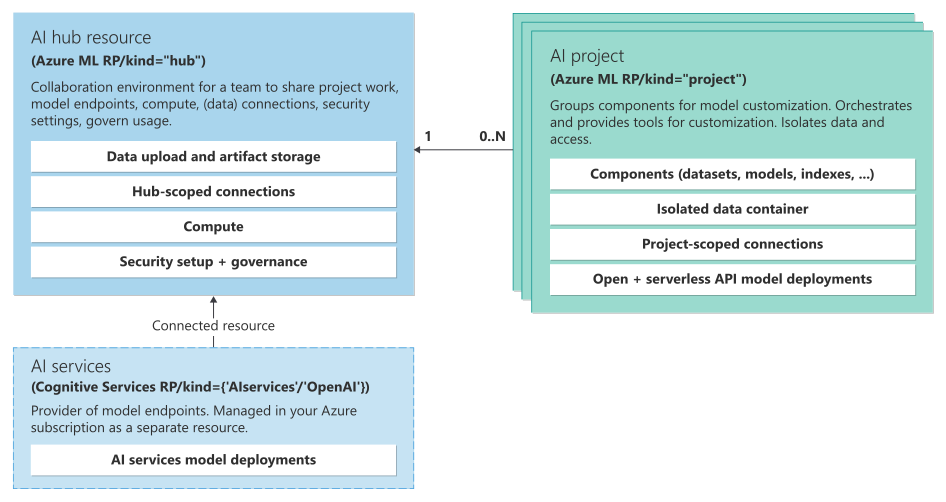 For more information, visit


